
 Qisstify
Installment software for shops in Pakistan
Qisstify keeps track of every customer, installment plan and payment in your shop. It shows who is due today and who is late, prints receipts in English and Urdu, and backs up your data every day.
Free download for Windows 10 and 11 · English and اردو
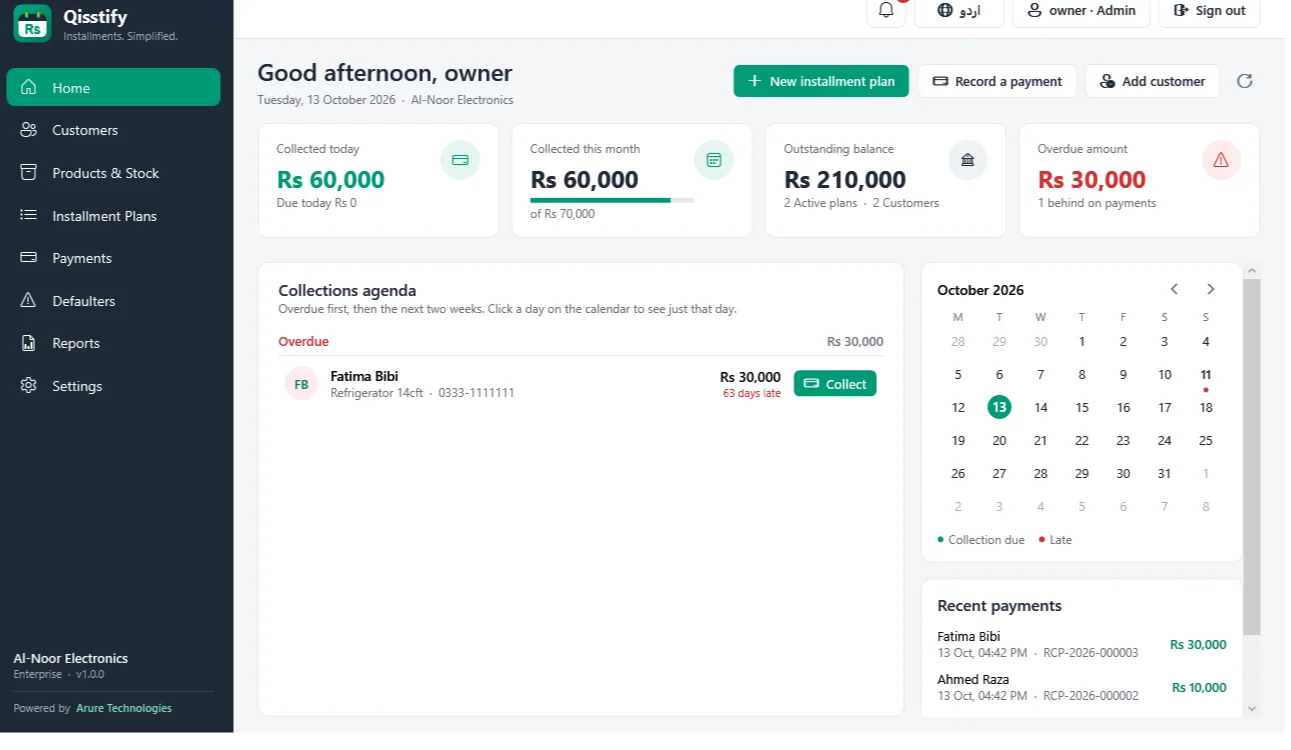
Everything a qist shop needs, in one app
Customers
CNIC and phone numbers are checked and formatted as you type, and a CNIC can only be used once.
Installment plans
Daily, weekly, monthly or quarterly plans with a down payment. You see the full schedule before saving, and it always adds up to the rupee.
Payments and receipts
The amount due is suggested, overpayments are refused and every payment gets a numbered receipt. Mistakes are reversed with a reason, never deleted.
Collections and defaulters
The home screen lists today’s collections and who is late. A daily Windows reminder shows installments due and customers behind on payments.
Reports
Daily, weekly and monthly collections, recovery, profit, stock and customer statements. Print them or export them to Excel.
Backups
An automatic backup every day, manual backups to a USB drive, and an optional copy to your Google Drive, OneDrive or Dropbox folder.
English and Urdu
Switch the whole app, receipts and reports to Urdu with a right-to-left layout.
Staff logins
Cashier, manager and owner roles, each with their own login. Every payment records who entered it.
Pricing
Each licence is tied to one computer. Download Qisstify and click Get a licence inside the app to see the price and pay.
What you need
- A PC with Windows 10 or Windows 11
- Any printer Windows can use: A4 or an 80 mm receipt printer
- A licence for each computer: yearly or one-time
Printing
- Bilingual receipts and reports
- Print preview in A4 or 80 mm receipt-roll size
- Every report can also be exported to CSV for Excel
Frequently asked questions
Is there a free trial?
No. Without a licence key you can set up your shop and add customers and products, but you cannot record sales or payments until a key is activated.
Does Qisstify work in Urdu?
Yes. The whole app, receipts and reports can be switched to Urdu, with a right-to-left layout. Exports to Excel keep the Urdu text.
Where is my data kept?
On your shop’s computer. Qisstify makes a backup every day and keeps the last seven. You can also back up to a USB drive and copy every backup to a Google Drive, OneDrive or Dropbox folder.
Can my staff use it?
Yes. Each person gets their own login. Cashiers can add customers, create plans, take payments and print receipts. Managers can also reverse payments, cancel plans and edit stock. Only the owner can change shop settings, the licence and users.
What happens if a customer pays the wrong amount?
Qisstify suggests the amount due and refuses overpayments. If a payment was entered by mistake, a manager reverses it with a reason; the original stays in the record.
How is Qisstify priced?
You can choose a yearly licence or a one-time licence with no yearly renewal. Each includes every feature and covers one computer. The current price is shown inside Qisstify when you click Get a licence.
How do I buy Qisstify?
Download Qisstify for free from qisstsecure.com/qisstify, install it, then click Get a licence inside the app. Pay by bank transfer, JazzCash or Easypaisa using the details shown there, and the licence installs by itself once the payment is confirmed.
Selling phones on installments? QisstSecure, also from Arure, locks and unlocks financed phones from a web dashboard.
Visit QisstSecureInterested in Qisstify?
Tell us about your business and we’ll help you get started, or answer any questions first.